Public sample
Citylights sample report
https://www.w3.org/WAI/demos/bad/before/home.htmlA clear starting point for your accessibility audit.
Captured 23 Sept 2026, 21:22 UTC. Four declared archive pages.
Download report
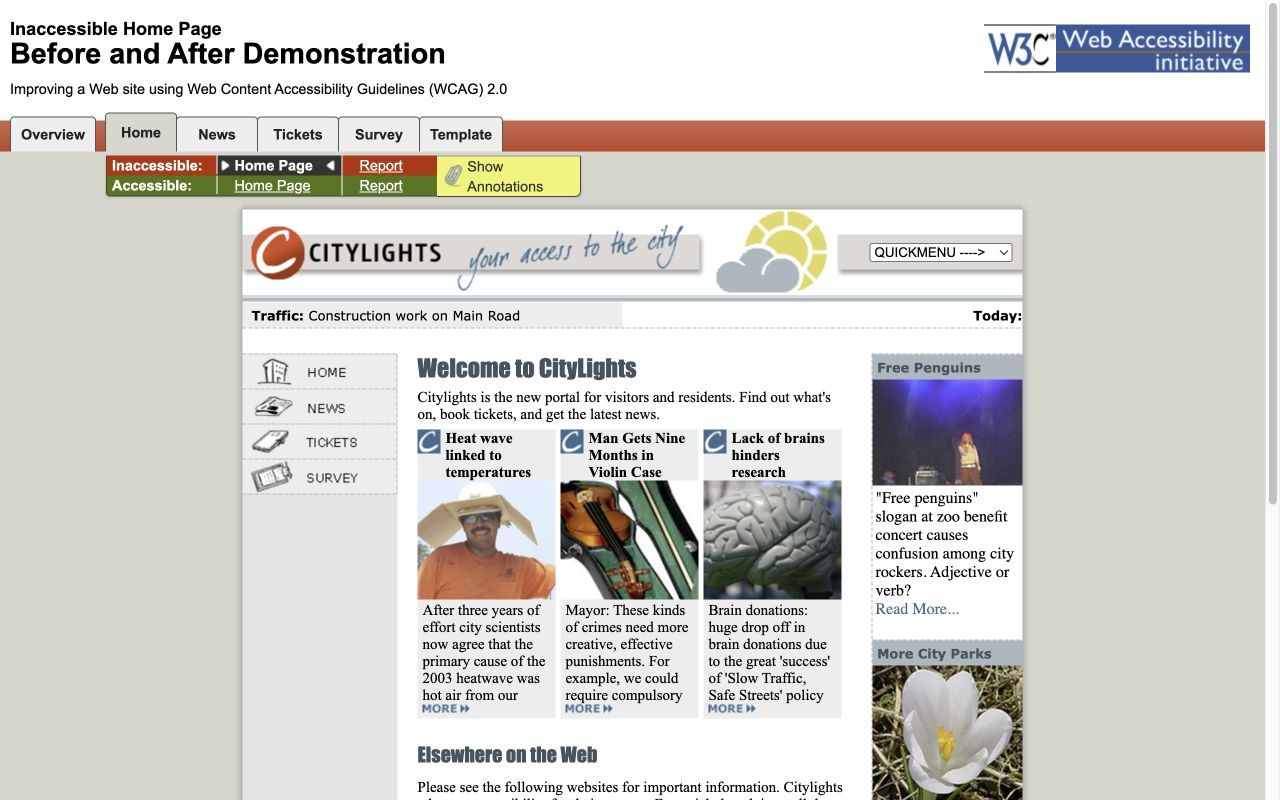
Homepage preview
- Pages in inventory
- 4
- Shared layouts
- 1
- Recommended audit pages
- 4
How we describe complexity
The features on a page tell us how much there is to review.
Simple
No forms, media, embedded tools or interactive components were recorded. Mostly reading and navigation.
Moderate
Some extra checks: a form, table, media player, embedded tool or interactive control. One to three complexity points.
Complex
Several interaction types or multiple forms. Four or more complexity points, or at least two forms.
How the rating is calculated
Forms, dialogs, date inputs, media and embedded services add two points each. Tables, tabs and expandable controls add one each. Detected interactive third-party tools add two points when no embedded service was already counted. Each feature type is counted once. This estimates review effort from the captured page, not accessibility quality. Hidden states can increase the work.
Not assessed means that capture or detailed feature evidence is missing.
Pages and layouts
Every discovered URL and its review complexity. Layout groups are inferred from analyzed page structure; CMS template names have not been verified.
Welcome to CityLights! [Inaccessible Home Page]
https://www.w3.org/WAI/demos/bad/before/home.html (opens in a new tab)Layout groupHome / News
ComplexityModerate10 tables
Welcome to CityLights! [Inaccessible News Page]
https://www.w3.org/WAI/demos/bad/before/news.html (opens in a new tab)Layout groupHome / News
ComplexityModerate11 tables
Welcome to CityLights! [Inaccessible Survey Page]
https://www.w3.org/WAI/demos/bad/before/survey.html (opens in a new tab)Layout groupUnique page
ComplexityModerate1 form, 23 tables
Welcome to CityLights! [Inaccessible Tickets Page]
https://www.w3.org/WAI/demos/bad/before/tickets.html (opens in a new tab)Layout groupUnique page
ComplexityModerate14 tables
Ideal audit scope
4 recommended pagesAll 2 unique pages, plus two different URLs from each of 1 shared layouts.
How we choose the sample
Include every unique page and two different URLs from each repeated template. Choose the structural representative first, then a page with different recorded features or language, preferring greater complexity. Template names describe likely shared layouts, not confirmed CMS templates. An auditor should confirm the grouping and extend the sample for important variations.
Welcome to CityLights! [Inaccessible Survey Page]
https://www.w3.org/WAI/demos/bad/before/survey.html (opens in a new tab)Layout groupUnique page
ComplexityModerate1 form, 23 tables
Welcome to CityLights! [Inaccessible Tickets Page]
https://www.w3.org/WAI/demos/bad/before/tickets.html (opens in a new tab)Layout groupUnique page
ComplexityModerate14 tables
Welcome to CityLights! [Inaccessible Home Page]
https://www.w3.org/WAI/demos/bad/before/home.html (opens in a new tab)Sample 1 of 2. 2 pages share this layout.
Layout groupHome / News
ComplexityModerate10 tables
Welcome to CityLights! [Inaccessible News Page]
https://www.w3.org/WAI/demos/bad/before/news.html (opens in a new tab)Sample 2 of 2. 2 pages share this layout.
Layout groupHome / News
ComplexityModerate11 tables
Third-party tools to include
Chat tools, accessibility widgets, plugins and embedded services can add their own controls and states.
No supported integrations were identified in the inspected markup.
Inspected 4 of 4 analyzed pages. Observed scripts, frames and plugin assets identify likely integrations. They do not prove a tool was active or fully tested. Tools loaded after consent, login or interaction may be missing. This sample inspects an inert archive whose source scripts were removed; it does not describe integrations on the original live site.
Take the scope with you
The same page inventory, sample recommendations and review notes, ready to share.
Download report
This is a proposed audit scope. Generating a report does not complete a manual audit or establish WCAG conformance. Private and unlinked content needs a separate scope decision.
Plan the accessibility audit
Build a clear agreement about what to test, why it matters and what the work involves.
0 selected of 4 analyzed pages
Explore planning with the four declared sample pages. Demonstration edits stay in this page; download your plan to keep it.
Loading the saved audit plan…
The evidence behind the scope
Inspect preserved pages, review recurring findings and verify the capture boundary.
Page inventory
Explore all four pages in the declared sample. Open the evidence to see archived HTML, screenshots, and findings.
4 matching pages
Welcome to CityLights! [Inaccessible Home Page]
https://www.w3.org/WAI/demos/bad/before/home.html
- Template
- Home / News
- Capture
- Preserved
- Automated findings
- 46
Welcome to CityLights! [Inaccessible News Page]
https://www.w3.org/WAI/demos/bad/before/news.html
- Template
- Home / News
- Capture
- Preserved
- Automated findings
- 47
Welcome to CityLights! [Inaccessible Tickets Page]
https://www.w3.org/WAI/demos/bad/before/tickets.html
- Template
- Tickets
- Capture
- Preserved
- Automated findings
- 42
Welcome to CityLights! [Inaccessible Survey Page]
https://www.w3.org/WAI/demos/bad/before/survey.html
- Template
- Survey
- Capture
- Preserved
- Automated findings
- 44
| Page | Template | Capture | Findings | Actions |
|---|---|---|---|---|
Welcome to CityLights! [Inaccessible Home Page] https://www.w3.org/WAI/demos/bad/before/home.html | Home / News | Preserved | 46critical | |
Welcome to CityLights! [Inaccessible News Page] https://www.w3.org/WAI/demos/bad/before/news.html | Home / News | Preserved | 47critical | |
Welcome to CityLights! [Inaccessible Tickets Page] https://www.w3.org/WAI/demos/bad/before/tickets.html | Tickets | Preserved | 42critical | |
Welcome to CityLights! [Inaccessible Survey Page] https://www.w3.org/WAI/demos/bad/before/survey.html | Survey | Preserved | 44critical |
Capture provenance and retention
Method, evidence identity and availability
Capture provenance and retention
Method, evidence identity and availability
- Evidence capture
- On
- Analysis completed
- 23 Sept 2026, 21:22 UTC
- Discovery
- complete
- Capture method
- Published archive demonstration
- Retention
- Not recorded
Manifest SHA-256: fd1758656ef7c3ae67d3e093a54edc04a091f4f592156a3416aad4954a8752de
Private, unlinked, blocked and excluded content is not represented as successfully captured. Discovery completeness applies to the configured public crawl.
About this sample
All four declared Citylights demonstration pages are included. This is a bounded example, not a crawl of w3c.org.
Captured from W3C's published 2012 demonstration archive. Styles and images were embedded locally; source scripts were removed. Axe checked the initial page at desktop and mobile widths. Screenshots show the viewport, not the full page. Forms and dynamic flows were not tested.
Citylights is part of the W3C/WAI Before and After Demonstration, published in 2012. Source material is reused under the W3C Software and Document License. OnChange prepared this example independently; W3C does not endorse it.
© 2012 W3C (MIT, ERCIM, Keio). Archived pages have embedded assets and disabled scripts, navigation and forms.
Now see the scope of your own site.
Start with a public domain. Keep the inventory and evidence together.